How do I restore a game license on PS5?
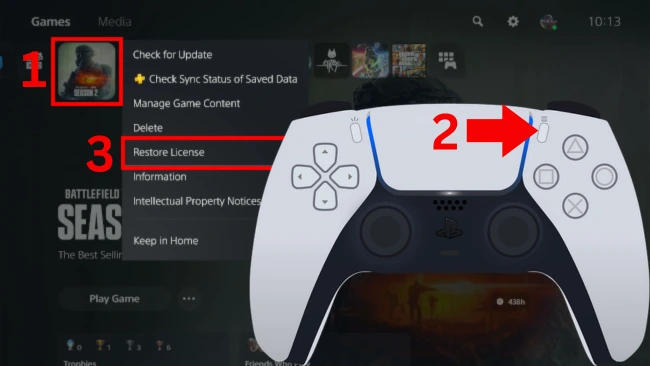
On the PS5 home screen, highlight the game, press the options button, and select Restore License.
PlayStation Support suggests restoring Store licenses if you see a lock icon not caused by an expired PS Plus subscription, if a game or add-on is missing, or if a title is crashing.
Restore via PS5 Settings
You can choose and restore licenses directly from the system settings menu.
- Go to Settings > Users and Accounts > Other > Restore Licenses.
- Select the licenses you want to restore.
Restore from Home or Your Library
Alternatively, you can restore the license directly from the game's options menu.
- Highlight the game on the Home screen or in your library.
- Press the Options button.
- Select Restore License.
Data Safety and Scope
According to PlayStation Support, "restoring licenses won't affect your data."
Restoring licenses is a general PS5 troubleshooting step. It may not resolve a GTA VI launch error.
How to Pre-Load GTA VI and Update PS5 System Software Before Launch