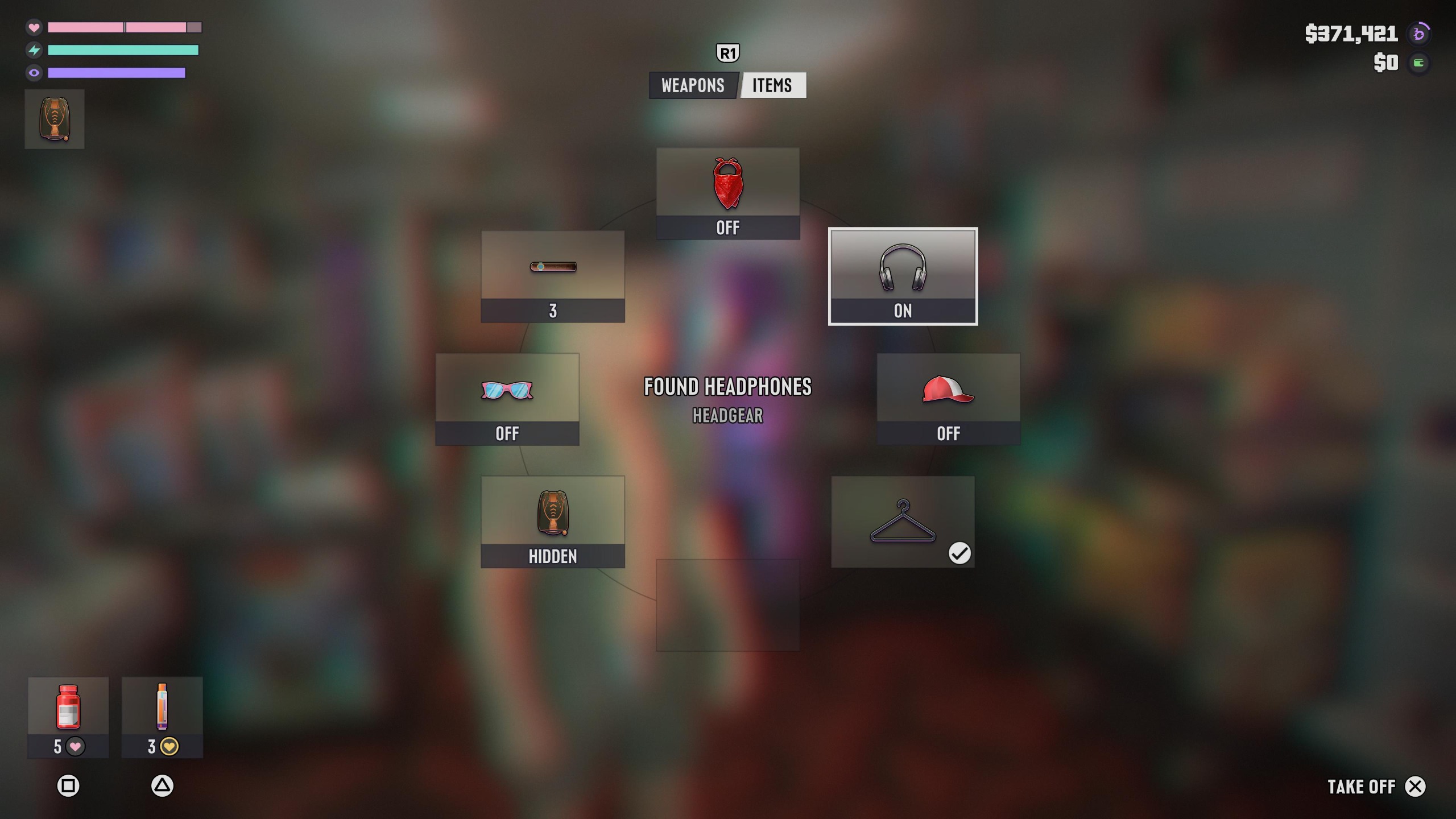
Headphone purchase rules and price
According to Josh West's guide for GamesRadar+, buy headphones or earbuds for the character you want to listen as. To listen as the other protagonist too, buy them a separate pair.
| Basic model price | From around $100 in-game (as reported by GamesRadar+ as of November 21, 2026) |
|---|---|
| Character requirement | Buy a pair for the protagonist you want to use. To listen as both, buy a pair for each. |
| Store finder path | Index → Style → Electronics |
| Loadout slot | The second slot on the Items wheel, labeled Headgear |
How to buy and equip headphones or earbuds
Once you locate a shop and buy a pair for the character you control, equip them from your loadout.
- Open Index → Style → Electronics to find the nearest electronics store.
- Buy earbuds or headphones for your active character.
- Hold L1 on PS5 or LB on Xbox to open your loadout.
- Press R1 on PS5 or RB on Xbox to move to the Items tab.
- Use the Right Stick to select the second slot on the Items wheel, labeled Headgear.
- Press Cross (×) on PS5 to equip them. GamesRadar+ says "press X to equip" using PlayStation notation; the Xbox button has not been confirmed.
See the Headgear slot for equipping headphones in the Items wheel (Pro-Gamer.gg)
How to choose a radio station on foot
With headphones or earbuds equipped, hold Left on the D-pad to open the radio menu. On Demand is available there, but the guide does not specify how to select it on foot.
- While wearing headphones or earbuds, press and hold Left on the D-pad.
- Keep Left held on the D-pad and select a station with L1 or R1 on PS5, LB or RB on Xbox, or the Right Stick.
- Release Left on the D-pad to start playing the selected station.
How to open On Demand in a vehicle and resume playback
Josh West notes in the GamesRadar+ guide that pausing an On Demand episode lets you resume from the same spot across both driving and walking.
- Inside a vehicle, press and hold Left on the D-pad.
- Push the Right Stick down to open On Demand.
- Press Square on PS5 or X on Xbox to switch episodes.
- Press Cross (×) on PS5 or A on Xbox to play.
What to check if headphones are missing or will not play
Being attacked while wearing headphones or earbuds can knock them off. If that happens, you need to pick them back up.
If they have not been dropped, open the Items tab of your loadout.
In the GamesRadar+ screenshot (English UI), the equipped second slot on the Items wheel, labeled Headgear (shown in the upper right), shows ON, with FOUND HEADPHONES and HEADGEAR in the center and TAKE OFF with × in the bottom right.
Also confirm that the protagonist you are currently controlling owns a pair, since Jason and Lucia each require their own purchase.