What happened to the player's random event progress?
In one case, a player put their PS5 into rest mode (the console's low-power sleep state) near the end of a random event (an unexpected encounter in free roam) and returned to find that GTA 6 had updated automatically and all progress on that encounter was gone.
The player did not know how to start that encounter again.
How to turn off automatic game update installation in PS5 rest mode
To stop your PS5 from automatically installing game and app updates during rest mode, change the console's automatic update settings.
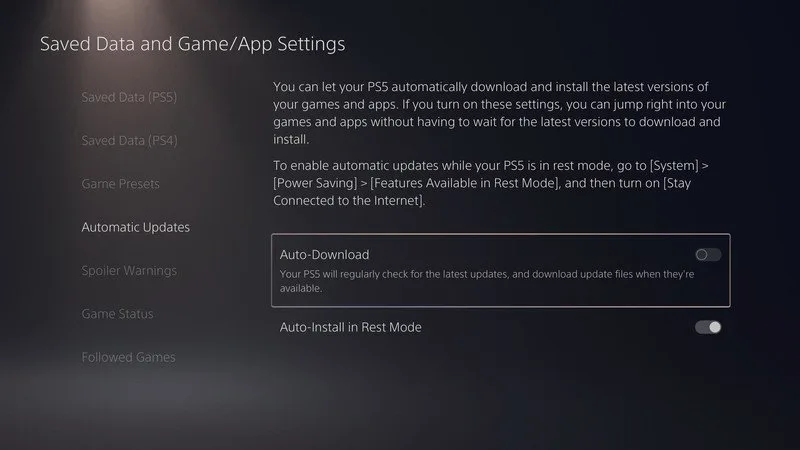
- Open Settings on your PS5
- Select Saved Data and Game/App Settings
- Select Automatic Updates
- Toggle off Auto-Install in Rest Mode
- Turn off Auto-Download as well if you also want to stop automatic downloads of game and app updates
| Auto-Download only | Downloads updates in rest mode without closing your suspended game; you choose whether to install when you resume |
|---|---|
| Both turned off | Stops both automatic downloads and automatic installation in rest mode |
| Rest mode internet setting | Automatic downloads and automatic installation in rest mode work when Settings > System > Power Saving > Features Available in Rest Mode > Stay Connected to the Internet is enabled |
How to save manually before entering rest mode
During normal free roam (exploring outside of missions), you can save manually on the spot without returning to a safehouse.
You normally cannot save manually during a mission.
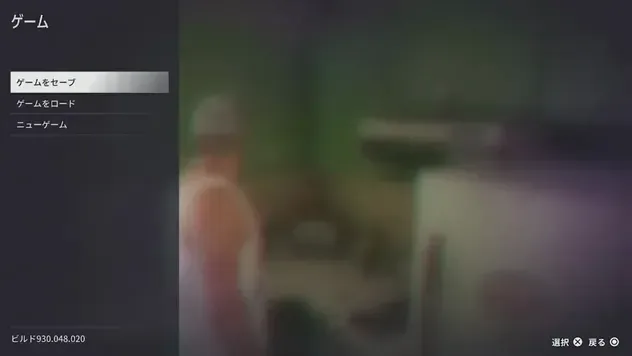
- Make sure you are in normal free roam outside of a mission
- Press the OPTIONS button to open the pause menu
- Select Game
- Select Save Game
- Choose a save slot
- Press X to confirm
Will a lost random event appear again?
Whether the random event returns after its progress was lost following the update is not yet known.
During ordinary play, an encounter you pass by can return. For more on how random events behave and whether they show on the radar, see the guide "Do GTA VI Random Events Show on the Radar?"