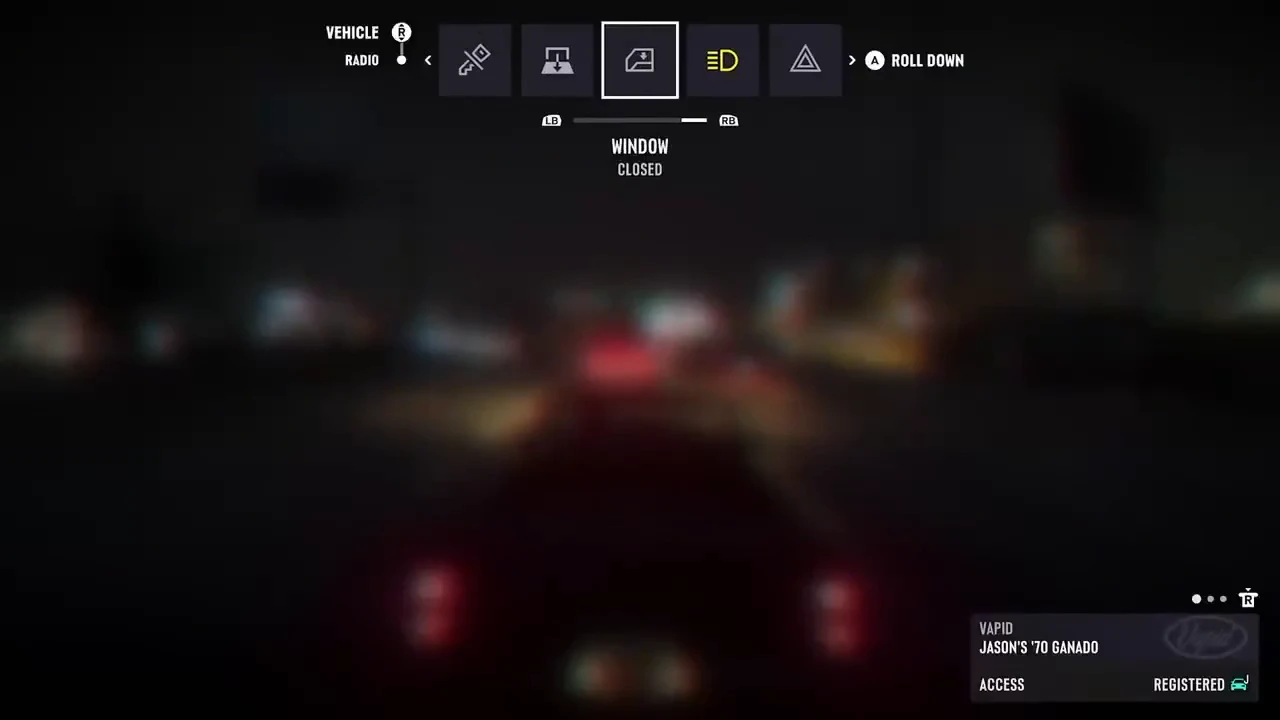
How to find the window status and button prompt
On the default Xbox layout, the Ganado’s Vehicle row shows A ROLL DOWN when WINDOW is highlighted and its status reads CLOSED. The prompt is visible at 0:00–0:02 in Leonida Interactive’s video.
- Hold D-pad Left in the Ganado.
- If the Radio row is selected first, push the right stick up to switch to the Vehicle row.
- Use LB or RB to highlight WINDOW.
- When the window status reads CLOSED, look for the A ROLL DOWN prompt.
See “WINDOW” and “A ROLL DOWN” (Leonida Interactive gameplay, 0:00–0:02)
What the controls table and video show
GTABase lists windows in the Vehicle Menu entry of the Actions table under Car, Motorcycle & Boat Controls. Leonida Interactive’s video shows the item label, window status and button prompt in the Ganado at 0:00–0:02.
| Platform | Xbox Series X|S (default Xbox layout) |
|---|---|
| Vehicle | Ganado |
| Menu location | Vehicle Menu entry in the controls table, Vehicle row in the video |
| Item label | WINDOW |
| Window status | CLOSED |
| Controller prompt | A ROLL DOWN |
| Observation period | Public record at launch |
What happens after pressing A, and do other vehicles show the same prompt?
The 0:00–0:02 excerpt shows the prompt for the closed window. It does not establish whether the player pressed A or whether the window went down.
The clip shows only the Ganado. GTABase’s controls table does not list vehicle-specific button prompts, so whether other vehicles show the same prompt remains unverified.