Switch back to 120Hz when six stars appear in the intro
The example that switched back to 120Hz before launching another game used an Xbox Series X, game version 01.002.001, and a 120Hz-capable screen.
VRR, which lets the screen match the game’s frame rate, was set to Game Only. Whether the same steps work with VRR off is still unclear.
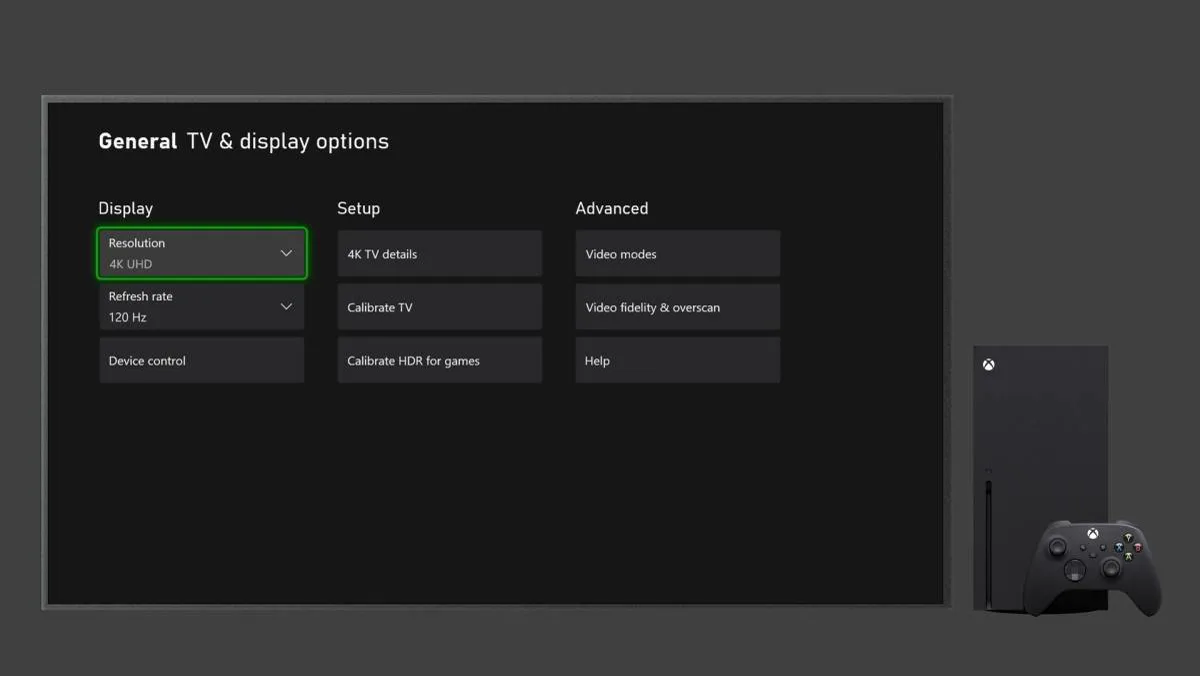
- In the Xbox display settings, set the refresh rate to 60Hz.
- Start GTA VI.
- Wait for six stars to appear in the intro.
- In the Xbox display settings, set the refresh rate back to 120Hz.
- With GTA VI still open, press the Xbox button to open the guide, the console’s shortcut menu.
- Launch another game from scratch through the guide.
- Return to GTA VI with Quick Resume.
Original steps for switching back to 120Hz when six stars appear
The example that starts with another game
This example also uses a TV or monitor that supports 120Hz. The second game was launched after switching back to 120Hz in u/Meowwie64’s example and before starting GTA VI in u/McHoBaggins’s example.
- Fully quit GTA VI.
- Check that Quick Resume is enabled in the Xbox menus.
- Load into another game.
- In the Xbox display settings, set the refresh rate to 60Hz.
- Start GTA VI.
- Select your save from the main menu.
- Return to Xbox Home when the title intro starts.
- In the Xbox display settings, set the refresh rate back to 120Hz.
- Resume the other game with Quick Resume.
- Resume GTA VI with Quick Resume.
What happens to frame rate and game speed?
In Chapter 1, Jason’s animations ran at roughly twice their usual speed or faster inside his home. Jason is one of the main characters.
The world also moved faster outside the house. The cutscenes, or story sequences, looked normal during that session.
For highway driving, Pure Xbox’s Fraser Gilbert estimated a maximum of around 35–40fps.
Usual frame-rate targets and Display settings on PS5 and Xbox
Driving clip and the poster’s notes on frame rate and game speed
What can you try to restore normal speed?
Gameplay may stay fast after a full quit and relaunch. GTA6BUGS recommends choosing Quit and launching GTA VI again to restore normal speed, while u/McHoBaggins still saw faster gameplay after powering off the Xbox and fully quitting the game.