

GTA VI tips for saving, travel and vehicles · Page 12
How to save manually, deposit cash at an ATM, fast travel and register a personal vehicle.
 How to Read GTA VI Wanted Stars: White, Flashing, Red, and HollowIn GTA VI's top-right HUD, solid white stars mean police have spotted you and are pursuing you, flashing stars mean line of sight has been broken and the wanted level is heading toward clearing, solid red stars mean Heat (the in-game alert that lingers in an area) remains after direct pursuit ends, and hollow white stars mean a crime was reported but police have not identified the suspect. These four come from The Independent's review of the PS5 Pro Ultimate Edition, played with pre-release access provided by Rockstar. According to Rockstar's explanation published by Destructoid, stars stay gray while police are still searching after losing sight, and switch to flashing once you leave the in-game inner search area without being spotted again.
 GTA VI Police on the Minimap? Spot Nearby Officers Through Walls With FocusIn GTA VI, individual officers' locations aren't shown on the minimap the way they were in earlier games. Focus can reveal nearby officers, even through walls (per Jack Briggs' launch guide on Mobalytics and other sources).
 GTA VI Credit Check: How to Split Up and What Happens to Wanted StarsIn GTA VI's Chapter 3 "Credit Check", when the split-up prompt appears during the "Lose the cops" objective, hold Right on the D-pad and press Triangle (PS5) or Y (Xbox Series X|S), per PowerPyx. TGG's pre-launch preview reported that splitting up while police have identified you as a duo can drop your wanted level by one star; the retail sources we checked don't confirm that change.
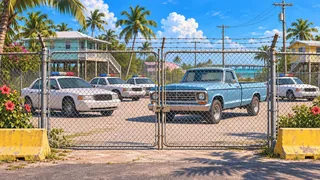 How to Get Your Impounded Personal Vehicle Back in GTA VI: Impound Locations and Scooter Bros RetrievalYou have two ways to recover an impounded personal vehicle in GTA VI Story Mode: go to the impound lot marked on your map and drive it out yourself, or request retrieval through the Scooter Bros app on your in-game phone (retrieval normally costs money). Scooter Bros unlocks after you register your first vehicle with Moses early in Chapter 2 and lets you recover registered vehicles that have been impounded. Outlets describe Premium's daily free allowance differently, with IGN reporting a warning that choosing impound retrieval uses up all remaining free deliveries for the day. Breaking your car out yourself can trigger an alarm and earn a wanted level.
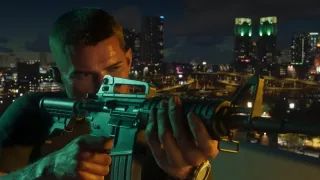 GTA VI: Do Non-Lethal Incapacitations Increase Focus? (Professional/Hardened)Per PC Gamer, non-lethal incapacitations increase the Focus gauge in GTA VI when the active character's criminal profile is Professional or Hardened. The amount gained, and whether a single non-lethal incapacitation changes your profile tier, are unconfirmed. Push Square says the yellow X marks a non-lethal incapacitation; the Heat rise comes from Rob Nelson's pre-release demo.
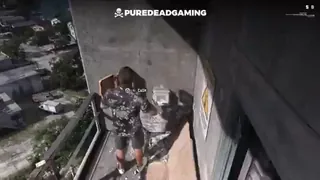 Where to Get and Confirm an Early Parachute in GTA VIIn PureDeadGaming’s launch footage from early in GTA VI, the character enters the concrete tower near the hideout, climbs the ladder, and picks up a parachute at the yellow case on the upper walkway. The next scene shows the pack on the character’s back.
 Where does the cash pickup prompt appear in GTA VI’s opening mission RV footage?At 0:03–0:26 in GTA6RICH’s footage of the opening mission, the cash pickup prompt appears on the counter inside the RV next to a white car. A green $ is visible on the minimap in the same scene.
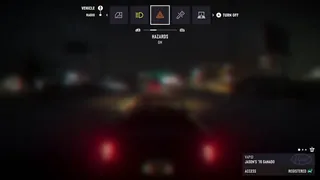 GTA VI: How to Turn On the Ganado’s Hazards and Check the TURN OFF Prompt on Xbox Series X|SOn the default Xbox layout, select HAZARDS in the Vehicle row of the Ganado’s vehicle menu. Press A only if the state is OFF and the prompt reads A TURN ON. When you see ON and A TURN OFF, the hazards are on. If you already see that display, you’re done.
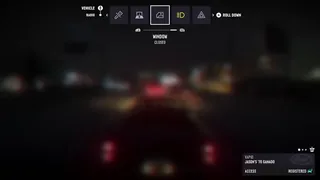 What Prompt Appears for a Closed Window in the Ganado on Xbox?In the Ganado on Xbox Series X|S, highlighting WINDOW on the Vehicle row on the default Xbox layout shows A ROLL DOWN when the status is CLOSED. The prompt identifies A as the button for lowering the window.
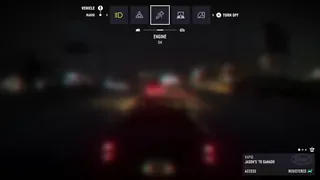 Where to Find the Ganado Engine Shutoff Prompt in GTA VIAt 0:12–0:13 in footage showing Xbox-style button prompts, TURN OFF appears beside the A-button icon when ENGINE is highlighted on the Ganado’s Vehicle row and its status reads ON.
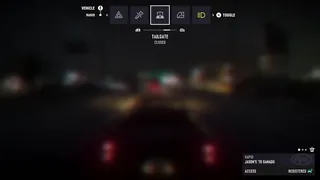 Toggle the Ganado Tailgate on Xbox via the Vehicle TAILGATE OptionOn Xbox Series X|S, select TAILGATE on the Vehicle row of the Ganado’s vehicle menu, then press the A button on the controller to toggle the tailgate. The footage does not establish how sedan trunks work or whether the same control works from outside the vehicle.
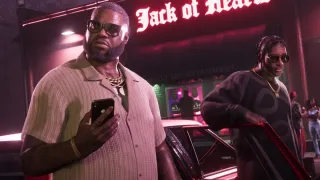 Why Driving With the In-Game Phone Open in GTA VI Feels DifficultA Kotaku reviewer found it harder to drive in GTA VI with the in-game phone open because they had to watch both the road and the phone menus while using other buttons to navigate those menus.