
GTA VI tips for saving, travel and vehicles · Page 4
How to save manually, deposit cash at an ATM, fast travel and register a personal vehicle.
 GTA VI Story List Empty or Listed Main Mission Won't Start: How to Fix ItAccording to Screen Rant, if no main missions are listed in your GTA VI Story list, open the recents list from the swirl icon at the top of your phone's home screen instead of regular Contacts and call each contact in it. If no mission appears, sleep at home until the next day, call as many contacts in your recents list as possible, and repeat for several days if needed. If a mission already appears in the list but will not start and is solo-only, say goodbye to your partner before entering the mission area; if it still won't start, wait until your partner is fully outside the area before entering.
 How to use the GTA VI minimap to check for rooms behind a shop's back doorsAccording to VGC's Jordan Middler, entering a shop in GTA VI shows the sales floor on your minimap, and getting close to the doors at the back of the shop makes the minimap show whether there is more space beyond. He adds that hidden stairs appear on the minimap when you get close enough to the stairs themselves. His article is the only basis found; it does not name specific shops, platforms, or builds, so whether this holds elsewhere is unconfirmed.
 How to Use Auto Drive in GTA VI's Cinematic Camera and Change SpeedIn GTA VI, set a destination on the map, enter the cinematic camera, accelerate slightly, and hold Circle (PS5) or B (Xbox) to let Auto Drive take you there. While active, L2/LT steps the speed down and R2/RT steps it up, shown as SPEED 1 / 2 / 3 at the bottom right (default: 2).
 Where to Find HDR Calibration in GTA VI Display Settings on PS5On PS5 at launch (English UI), you can open HDR Calibration from Settings → Display in the pause menu while HDR is set to On. Adjust Max Brightness, Black Levels, and Paper White with the directional buttons while viewing the test image, then press × to confirm. The right values depend on your TV, and we haven't confirmed any recommended values for OLED TVs, so follow the in-game instructions.
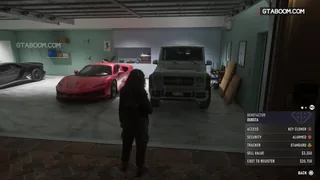 Selling Stolen Cars at Pay ’n’ Spray in GTA VI: Standard Trackers From Chapter 3, Conflicting Reports on Higher-Tier TrackersIn GTA VI Story Mode, PowerPyx, gta6-maps.net and Timesaver report that from Chapter 3 (early Chapter 3, per PowerPyx and gta6-maps.net) you can sell cars with standard trackers at any Pay ’n’ Spray. PowerPyx puts a good car at around $4,000+ (in-game dollars), and Timesaver’s $2,500 to $4,000 per car is an estimate combining figures from different sources. Reports on higher-tier trackers are split: Alcast says cars with a high-end tracker are refused, while GTABase says advanced-tracker cars can be registered or sold, and the conditions for selling them at a shop, including before or after Randy’s unlocks, are unconfirmed. Alcast also reports a daily cap on stolen-car sales. Whether the SELL VALUE shown in WAiNK matches what Pay ’n’ Spray pays is unconfirmed.
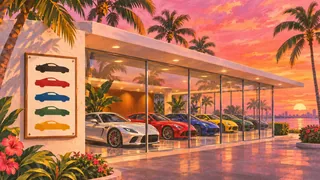 GTA VI Randy's Wish List: Unlock Missions, 18 Cars, and Typical PayoutPer PowerPyx's published guides, Randy Kozlov's Wish List is explained in Chapter 3's Clonin’ Keys, Makin’ Gs (after Crosstown Traffic) when you deliver a Zorrusso to the showroom and follow Randy to the board. Randy becomes a delivery contact in Chapter 3's Car Service (after Meet the Heders) at Leonida Auto World in Balsero. The list covers 18 high-end sports cars, and a car delivered in perfect condition usually pays $30,000+.
 GTA VI PS5: Where to Find Deadzone, Vibration, Adaptive Trigger, and Invert Look SettingsOn PS5, the Controller tab (Options → Settings → R1) holds separate left and right stick deadzones, Vibration & Haptics Strength, and adaptive trigger resistance and vibration (DualSense features), plus Look and separate Movement, 3D Map Rotation, and Aircraft Movement inversion (Inverted Controls). Checked on the launch version with English UI.
 Where to Find Subtitle Settings and Change Text Size in GTA VI on PS5Pause the game, open Settings, press R1 to reach the UI tab, then scroll down to Subtitles & Captions. Use Subtitles to choose when dialogue subtitles appear and Size to choose from three text sizes.
 GTA VI on Xbox Series X|S: Dismemberment and Blood & Gore Intensity Settings in the Japanese vs. Overseas EditionAccording to Game*Spark's comparison on Xbox Series X|S, the overseas edition lets you change Dismemberment and Blood & Gore Intensity (three levels, defaulting to High, the strongest) in the settings' DISPLAY tab. The Japanese edition's Display tab still has Dismemberment, labeled 切断, but no blood and gore intensity option was found, leaving 11 items instead of 12.
- GTA VI PS5 Settings: Turn Off Motion Blur and Change Camera Follow SpeedIn the English PS5 menus ViceManual recorded at launch, setting Motion Blur Strength to 0 under Display turns off motion blur. Under Camera, Horizontal Follow Speed controls how quickly the camera returns behind you horizontally on foot, and Vertical Follow Speed controls its vertical return. For land and water vehicles, adjust driver camera return speed with Horizontal Follow Speed (Driver) and Vertical Follow Speed (Driver) under Camera > Land & Water Vehicles. According to All Things How, both of those Follow Speed sliders in the English PS5 menu have a default and maximum of 10, and lowering either slider slows the camera’s return on that axis. The sources give no return times for 4 or 5.
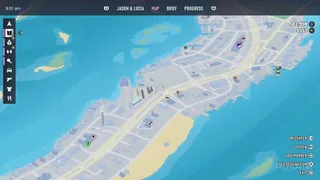 Locate the Next Mandatory GTA VI Mission on the PS5 MapOn the PS5 map, press Right in the left-hand index to see available story missions. Select a required objective near the top of the list and press Cross to set it as your destination.
 GTA VI Inflatable Flamingo: How Many Flamingos to DestroyPowerPyx lists destroying 50 cocaine flamingos as the requirement for Inflatable Flamingo and says cheats can be used after finishing the main story. PowerPyx says the cheat spawns an Inflatable Flamingo. We haven’t independently verified what appears after the 50th flamingo is destroyed or tested the cheat in-game.